
If you’re dealing with hard water, on well water, or just want the safest drinking water possible for your family, this post walks through how to install a water filtration system for your home. Watch our video on the process to get the complete breakdown.
This is the follow-up article to my previous post on testing our water and choosing the right system. In this guide, I’ll focus specifically on how the water filtration system was installed, what tools and materials were used, and what to expect if you decide to tackle this project yourself.
The good news is that this is a very DIY-friendly project and can save you thousands of dollars compared to hiring a pro. If you think this setup would work well for your home, use Promo Code DIYPETE10 for 10% off your entire order at Springwell.
Please note there are affiliate links in this article. By using the links to purchase the items used in this project you are helping support our DIY Projects with Pete. Thank you!
System Overview: What We Installed
Our complete water filtration setup:
Test Kit
Smart Water Monitor + Automatic Shutoff Valve
Water Sediment Filter
Water Softener (with brine tank)
UV filter (for bacteria protection)
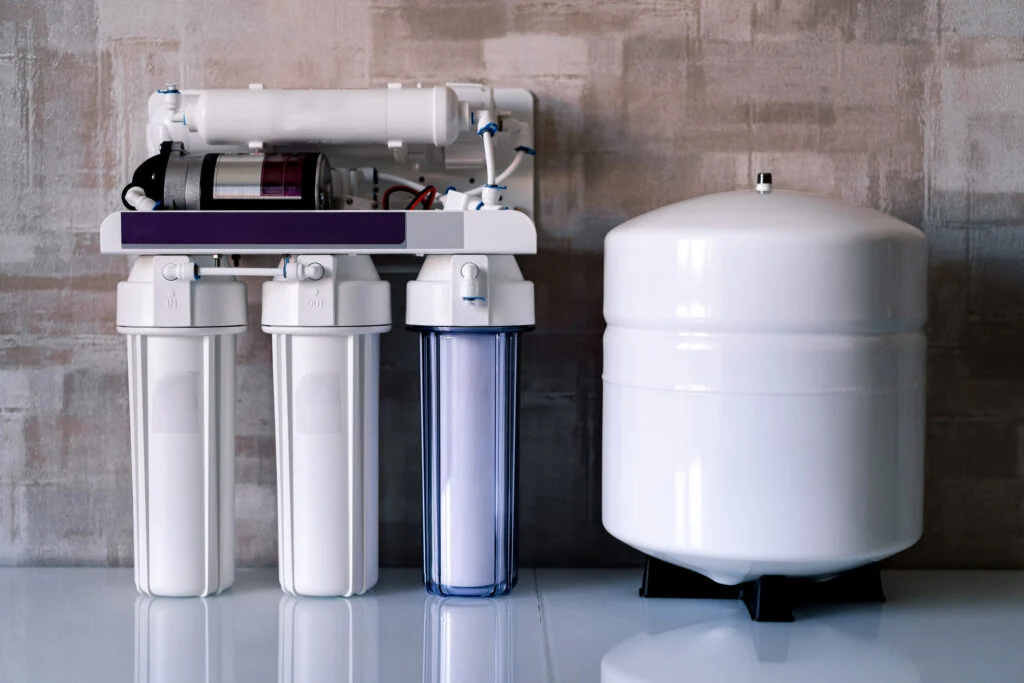
Tank-based reverse osmosis (RO) system
Optional RO feed to refrigerator
Tool List
Pex Crimping Tool
Pex Cutting Tool
Copper Pipe Cutter
Teflan Tape
This setup addresses:
Hard water
Unwanted sediment
Bacteria
Improves drinking water quality
Step 1: Prep Work & Safety
Before touching anything:
Shut off all breakers related to water, shut off the main water supply and relieve pressure in the system.
Our previous setup was very basic with just a pressure tank and water heater so this was a big upgrade for our home.
Step 2: Install the Smart Water Monitor & Shutoff Valve
For peace of mind, I installed a smart water monitor with automatic shutoff right away.
Why this is worth it:
Tracks water usage
Alerts you to leaks
Automatically shuts off water if something goes wrong
Can be controlled and monitored from your phone
To install the smart water monitor with automatic shutoff, I used a SharkBite fittings to transition from the copper to the valve, inserted the smart water monitor and shutoff valve, then converted the rest of the system to ¾” PEX. Make sure to install the shut off valve before the filter.
Step 3: Sediment Filter Installation
The sediment filter is the first line of defense for your system.
We installed a 500-micron filter that can be replaced when needed. I mounted the bracket to a ¾” plywood wall and then attached the water filter. I used fittings with Teflon tape wrapped clockwise around and then attached them to each side of the filter. The water will flow from left → right.
This filter keeps larger particles from entering appliances, water heater and softener.
Step 4: Water Softener Installation
This was my first time installing a water softener, but it was very manageable.
Key steps:
Install bypass valves, then add elbow fittings for flexible lines. I moved the unit into position and connected the inlet/outlet lines.
Black tubing is then ran from the softener to the brine tank and connected to a push fitting inside the tank. Clear drain tubes were ran from the brine tank to the floor drain with a step bit used to enlarge drain holes (mine were too small). I used zip ties to secure the tubing in place.
Step 5: First Regeneration Cycle
The softener connects via Bluetooth and is configured through an app.
Run an initial regeneration cycle. My initial regeneration took ~90 minutes
The system flushes capture minerals and ensures the system is running smoothly. It will go through about four stages than begin to fill the brine tank. When the cycle is finished the unit will display the amount of gallons remaining until the next cycle is needed.
I set mine to regenerate at every 14 days, or at 3,926 gallons, whichever comes first. Stay nearby during the first cycle to check for any leaks.
Step 6: Clean Fixtures After Softener Install
Once soft water was running:
We cleaned all fixtures with vinegar and removed old hard water buildup. Shower heads, faucets, and glass doors have stayed clean ever since with cleaning noticeably easier with the softer water.
Step 7: UV Filter Installation
Since we’re on a well, we decided to add a UV filter to give us peace of mind between annual well shocks.
First, mount the brackets to wall. Make sure to leave extra clearance above the unit for bulb changes. I used a pex connection for where the water lines will connect to the filter. Then the display unit was mounted to the wall.
Next the UV unit was inserted securely into the brackets. The glass sleeve was inserted carefully, follwed by the threaded peice and a spring. Then, make sure to wear gloves and insert the UV bulb. Attach a power cord and twist it in place to complete the basics of installing your UV filter.
Step 8: Reverse Osmosis (RO) System Install
This reverse osmosis system lives under the kitchen sink and provides ultra-clean drinking water. Clean out your under sink cabinets and turn off your water supply. You’ll need a hole for the RO faucet. We used an existing soap dispenser hole or you might have to drill a hole.
Steps to Install:
First, disconnect your current kitchen faucet from the water supply. You’ll use a ‘T’ to split the line so it can go to your current water or your new osmosis system.
The tank will fit underneath on a stand and you’ll have to find a good spot to mount the filters. Mark and drill a hole in your drain pipe. This is going to be where your RO system with drain the waste or excess water. Clamp on your connection peice and tighten. I used a drill bit to stick in the hole to make sure it all lined up.
Next, prep the storage tank by using the teflon tape and supplies provided and find a spot to place it. The filter cartridge holder can be mounted to the cabinet. Keep it raised high enough so the filter cartages can be replaced when needed. The filters have different shaped attachments for easy installation. Label your filters with replacement dates to make it easy to remember when it’s time to change them out. This is usually every 6 to 12mo depending on the filter type. Twist each filter in place, making sure each is locked into position.

Leave a Reply